Disclosure: This post is part of SnapRender’s Premium launch on Go Publicly. SnapRender paid for the feature, but the review and opinions are our own.
A screenshot API sounds simple until you run one yourself. With Puppeteer or Playwright, you manage cookie banners, lazy images and fonts. You also restart Chrome when memory creeps up or consent dialogs change. SnapRender handles the browser work as a managed screenshot API. Send a URL in one HTTP call and get back a PNG, JPEG, WebP or PDF from real Chrome. Cookie walls and ads are cleared by default.
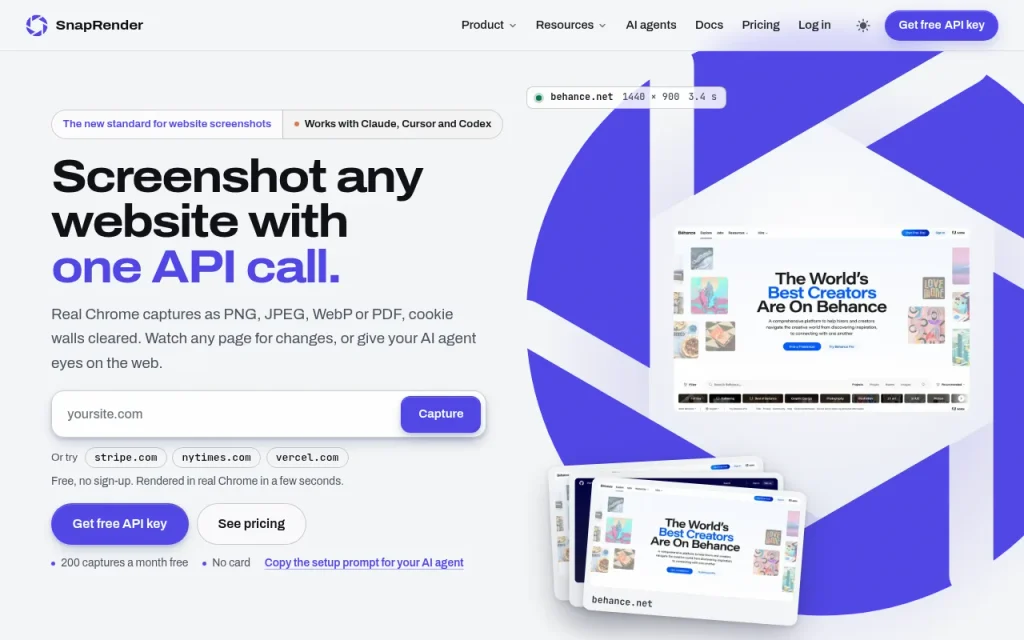
This SnapRender review covers what this screenshot API does, how a capture works, and its published pricing. It also looks at who it suits, how it compares with other APIs, and how Go Publicly founders can use it. SnapRender is launching on Go Publicly as a Premium launch.
What Is SnapRender?
SnapRender is a production screenshot and rendering API. You send a public URL (or HTML or Markdown) and it returns a capture rendered in real Chrome. According to its about page, it is aimed at development teams, agencies and AI products that need link previews, visual monitoring, client reports or a way for AI agents to “see” the web.
It is not a design tool that beautifies screenshots. It is infrastructure: the capture layer your app, agent or reporting job calls. When that workflow needs a screenshot API, SnapRender means you do not have to keep Chromium alive yourself.
Public pages name the founder as Alex (also listed as Aleksis), with the X handle @SnapRenderAPI. On Go Publicly it sits in Developer APIs, with a launch page at go-publicly.com/launch/snaprender (listed as launched 10 November 2026).
Why Developers Look for a Screenshot API
Self-hosting screenshots can become a product of its own. SnapRender’s homepage lists the usual failure modes: a server just for Chrome and fonts, pages that never go idle, and a different consent dialog on every site. Lazy images may stay blank until something scrolls, and late web fonts can fall back. Crashes or memory growth can force restarts. A screenshot API moves that browser maintenance out of your own stack.
A managed screenshot API trades that ops work for a per-capture (or monthly) fee. You keep the result (a clean image or PDF) and drop the browser fleet. That is useful when you need:
- Link previews or website thumbnails in a directory or feed
- Agency reports of client sites on a schedule
- Competitor or pricing-page change alerts
- Visual checks in CI on preview deploys
- Screenshots or page-as-markdown for an AI agent
If you only need one-off manual shots for a blog post, a free browser extension is enough. A screenshot API makes more sense for captures from code, on a schedule, or from an agent.
How SnapRender Works (Step by Step)
From the API docs:
- Sign up with Google, GitHub or email. The free plan needs no credit card. You get an API key (
sk_live_…) in the dashboard. - Call the screenshot endpoint. Base URL:
https://app.snap-render.com. Example:
curl "https://app.snap-render.com/v1/screenshot?url=https://example.com&format=png" \
  -H "X-API-Key: YOUR_API_KEY" \
  --output screenshot.png
- SnapRender opens the page in real Chrome, clears cookie walls and ads (on by default), waits for lazy images and web fonts, then returns the image binary (or JSON with base64 if you ask for it).
- Optional parameters control format (PNG, JPEG, WebP, PDF), viewport (320–3840 px), full-page capture, device presets (iPhone, Pixel, iPad, MacBook), dark mode, caching, and whether to block banners or ads.
- SDKs wrap the same API for Node.js (
npm install snaprender), Python (pip install snaprender) and Go. There is also an OpenAPI spec, Postman collection and n8n node (SDKs page).
Typical fresh captures take about 2–5 seconds according to SnapRender’s FAQ; cached repeats (when you enable cache) return much faster and do not count against quota.
Beyond a single shot
- Scheduled captures: hourly, daily or weekly; each version keeps a SHA-256; pixel diff can email you or fire a signed
change.detectedwebhook (homepage). - Batch: up to 50 URLs per call, with a webhook when the job finishes.
- Content extraction: the same render as markdown, article text, links or metadata (
GET /v1/extract). - MCP server: hosted at
https://app.snap-render.com/mcpwith 11 tools for Claude, Cursor, Codex, VS Code and similar clients, so an agent can take screenshots and read pages without pasting a key into every chat.
Key Features
| Area | What you get (per SnapRender’s site) |
|---|---|
| Capture | PNG, JPEG, WebP, PDF; viewport 320–3840 px; full-page; device presets; dark mode; URL, HTML or Markdown input |
| Clean | Cookie banners removed, ads/trackers blocked, lazy images scrolled into view, fonts waited for — on by default |
| Watch | Schedules with history, pixel diff, email and signed webhooks |
| Scale | Batches of 50, caching up to 30 days on higher plans, signed URLs |
| AI | Hosted MCP server, extract-as-markdown, JSON + base64 responses |
| Safety | SSRF protection, rate limits in responses, public status / 99.9% uptime claim |
Important commercial detail from the pricing page: every plan includes the full feature set. Plans differ by monthly quota, burst rate, per-domain rate and cache TTL — not by locking schedules or MCP behind a higher tier.
SnapRender Pricing (checked 9 November 2026)
Prices below are from snap-render.com/pricing. Yearly billing is listed as two months free (ten months of the monthly price). Always confirm on the live page before you buy.
| Plan | Monthly | Yearly (listed) | Screenshots / month | Approx. cost per capture |
|---|---|---|---|---|
| Free | $0 | — | 200 | Free |
| Starter | $9 | $90 / yr | 2,000 | $0.0045 |
| Growth | $29 | $290 / yr | 10,000 | $0.0029 |
| Business | $79 | $790 / yr | 50,000 | $0.0016 |
| Scale | $199 | $1,990 / yr | 200,000 | $0.001 |
When you hit the monthly limit, requests return a quota message with the reset date; SnapRender says nothing is charged automatically. You upgrade from the dashboard or wait for the next month.
SnapRender vs Other Screenshot APIs
SnapRender publishes its own comparison table against ScreenshotOne, Urlbox (Hi-Fi), ApiFlash, CaptureKit, Microlink and htmlcsstoimage, with prices it says were taken from each vendor’s pricing page on 6–7 October 2026. A shortened version of their published numbers:
| Captures / month | SnapRender | ScreenshotOne | Urlbox (Hi-Fi) | ApiFlash | CaptureKit |
|---|---|---|---|---|---|
| Free plan | 200 | 100 | None | 100 | 100 |
| 2,000 | $9 | $17 | $49 | $35 | $16 |
| 10,000 | $29 | $79 | $67 | $35 | $29 |
| 50,000 | $79 | $259 | $240 | $180 | $89 |
| 200,000 | $199 | $859 | $800 | Quote | $1,214 |
Source: SnapRender pricing / compare section. Competitor prices change; treat this as SnapRender’s dated claim, not an independent audit.
Fair read:
- Choose SnapRender if you want a large free tier (200/mo), every feature on every plan, scheduled change detection, SDKs plus MCP, and lower published list prices at mid/high volume.
- Look at ScreenshotOne or Urlbox if you already depend on their ecosystems, need a specific feature SnapRender does not list, or want a longer track record from a more established vendor.
- Look at Microlink / lighter thumbnail services if you only need tiny previews and not full production captures with schedules and webhooks.
- Keep self-hosted Puppeteer/Playwright if you must capture logged-in sessions inside your own VPC with full control of the browser profile (SnapRender captures public pages; custom headers are supported, but it is not your logged-in browser).
SnapRender also maintains per-competitor write-ups under /alternatives.
Who SnapRender Is For (and Who It Is Not)
A good fit if you:
- Build link previews, directories, galleries or OG-style thumbnails from URLs
- Run an agency that needs weekly client-site captures and change alerts
- Want competitor pricing or landing pages watched without writing a scraper
- Are giving an AI agent a way to screenshot or read pages (MCP)
- Are tired of maintaining Chromium in production or on serverless
Probably not the right tool if you:
- Only need occasional manual screenshots for social posts (use a screenshot beautifier or a browser extension instead)
- Need to capture pages behind complex login flows or private networks without firewall rules
- Expect design editing, annotations or marketing mockups — that is a different category
For a wider set of maker tools, see Go Publicly’s indie hacker tools and the developer tools for indie hackers guide.
How Go Publicly Founders Can Use SnapRender
A few practical uses after (or before) you launch on Go Publicly:
- Directory and launch thumbnails. If you run a gallery of tools or clients, generate consistent site thumbnails via the API instead of hand-cropping.
- Change monitoring on competitors. Schedule daily captures of rival pricing or feature pages; webhook your Slack or inbox when the pixel diff crosses a threshold.
- Agent-assisted research. Point Claude or Cursor at the MCP server so the agent can capture a page while it helps you write a launch post or competitive note.
- CI visual smoke checks. Hit preview deploy URLs from GitHub Actions and fail the job if the capture errors (pair with SnapRender’s own CI/GitHub Actions guides on their blog).
- Archive proof. Keep dated, hashed captures for compliance or “what the site looked like on launch day.”
Browse other developer APIs on Go Publicly launches and upvote SnapRender on its launch page.
Limitations to Know
- Public pages first. SnapRender opens pages without your browser session. Logged-in app UIs need another approach (or custom headers / firewall allowlisting for sites you control — see their allow guide).
- Newer than category incumbents. ScreenshotOne and Urlbox have been around longer; weigh maturity vs price and free tier for your risk tolerance.
- Quota hard-stops. Hitting the monthly cap returns errors until reset or upgrade; build retries and monitoring if captures are user-facing.
- Claims we did not independently verify. “500+ developers,” “99.9% uptime,” and competitor prices are taken from SnapRender’s own pages and dated comparison notes. Check the status page / live status link and competitor pricing yourself before a large commitment.
- Not a beautifier. Output is a faithful Chrome render. For polished marketing frames, run the file through a separate tool.
Key Takeaways
- SnapRender is a managed screenshot API: one call, real Chrome, cookie banners and ads cleared by default.
- Free plan: 200 captures/month, all features, no card. Paid plans from $9/mo (2,000) to $199/mo (200,000), checked 9 November 2026.
- Differentiator for many indie teams: schedules + change webhooks + hosted MCP on every plan, not only the top tier.
- Strong option when self-hosted Puppeteer is costing more time than money; less ideal for private logged-in captures or one-off manual shots.
- Live launch: go-publicly.com/launch/snaprender.
Frequently Asked Questions
What is SnapRender?
SnapRender is a screenshot API that captures any public website in real Chrome and returns PNG, JPEG, WebP or PDF. It also supports scheduled captures with change alerts, content extraction as markdown, batch jobs and a hosted MCP server for AI agents.
Is there a free SnapRender plan?
Yes. According to SnapRender’s pricing page, the free plan includes 200 screenshots a month with every feature and no credit card. Sign in with Google, GitHub or email to get an API key.
How does SnapRender pricing compare to ScreenshotOne or Urlbox?
On SnapRender’s own comparison (prices it dated 6–7 October 2026), 2,000 captures/month are $9 vs ScreenshotOne $17 and Urlbox Hi-Fi $49; 50,000 are $79 vs $259 and $240. Confirm current competitor prices before deciding.
Can SnapRender remove cookie banners?
Yes. Cookie banner removal and ad blocking are on by default for every plan. You can turn either off per request with block_cookie_banners=false or block_ads=false.
Does SnapRender work with Claude or Cursor?
Yes. SnapRender hosts an MCP server at https://app.snap-render.com/mcp with 11 tools. Compatible clients can authenticate in the browser and take screenshots or read pages as markdown.
Can I watch a page for changes?
Yes. Scheduled captures run hourly, daily or weekly, store each version with a SHA-256, compare pixels to the previous capture, and can email you or call a signed webhook when the change passes your threshold. The free plan includes schedule options (daily or weekly per SnapRender’s FAQ).
Is SnapRender a good Puppeteer alternative for screenshots?
For public-page screenshots in production, often yes: you drop Chrome ops and call an API. Keep self-hosted browsers when you need deep control of logged-in sessions or private networks.
Ready to Try SnapRender?
If you need website screenshots from code without running Chrome yourself, try the screenshot API on the free plan at snap-render.com, read the docs, and support the launch on Go Publicly.
Building your own developer tool? Launch on Go Publicly — free, or Premium from $15 one-time — and see pricing.

Founder and builder working on internet products and startup tools. Passionate about launching simple platforms that help makers showcase their work and reach early users.